Cloud Render API
💼 This API is available on the Enterprise plan. Contact us via the pricing page to get access.
What is the Cloud Render API?
The Ydesign SDK can generate images on the client via store.toDataURL() / store.toBlob(). But some scenarios are painful (or impossible) to run in the browser:
- Batch rendering: produce 1000 variations (marketing assets, product shots, dynamic posters)
- Backend jobs: scheduled tasks, webhook handlers, queue consumers
- High-fidelity export: print-level resolutions and oversized canvases that exhaust browser memory
- Headless environments: offload rendering from the user's device to reduce client cost
You could run fabric.js on your own Node server, but you'd have to handle: canvas polyfills for Node, custom font loading, cross-origin image fetching, Ydesign-specific extension fields (__strokeOptions) and so on.
The Ydesign Cloud Render API handles all of that. Send us a fabric JSON (exported via store.toJSON()) and we return a rendered image URL. The stack is fabric.js + Node.js, so output is pixel-identical to the client.
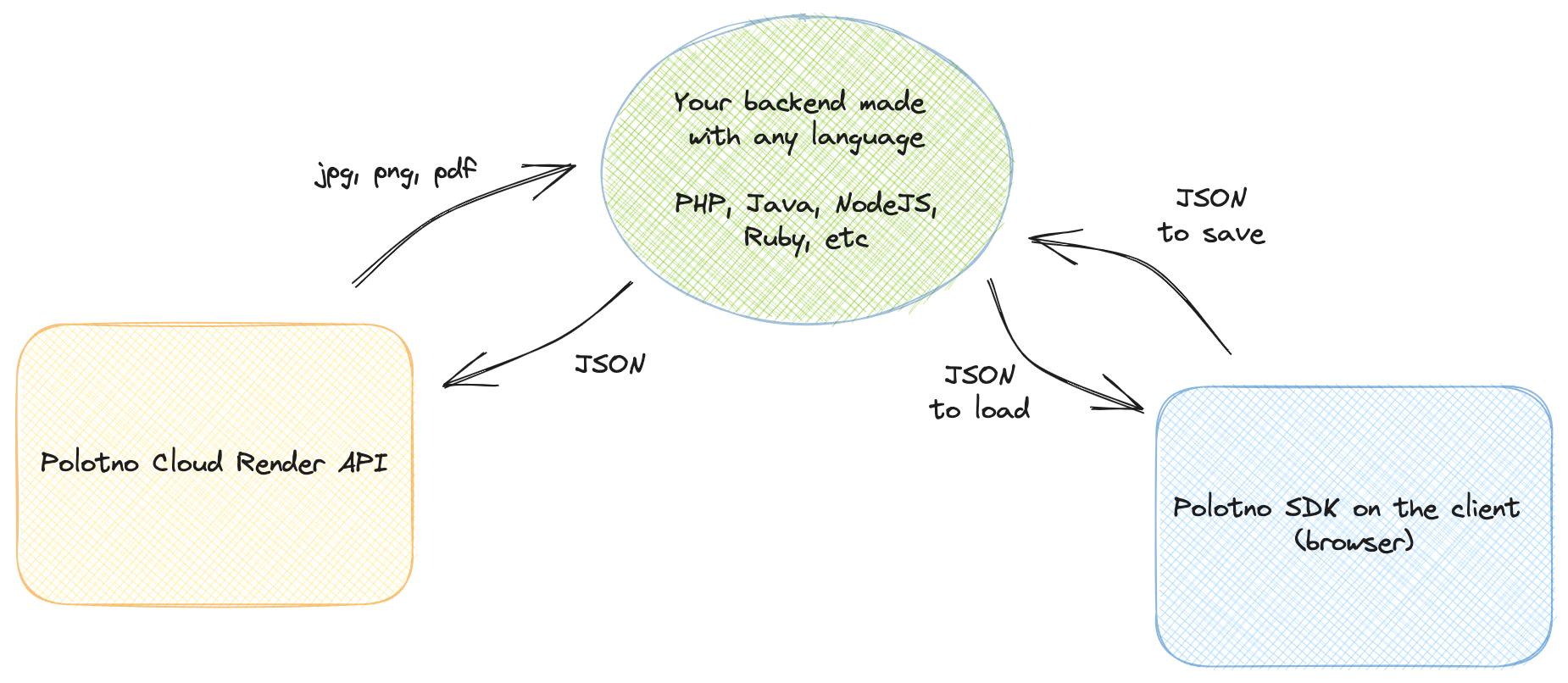
Overview
- Endpoint:
POST https://api.ydesign.com/api/render/image - Content-Type:
application/json - Auth:
Authorization: Bearer YOUR_API_KEY
Minimal example
const req = await fetch('https://api.ydesign.com/api/render/image', {
  method: 'POST',
  headers: {
    'Content-Type': 'application/json',
    Authorization: 'Bearer YOUR_API_KEY',
  },
  body: JSON.stringify({
    // 1) fabric JSON from store.toJSON()
    json: store.toJSON(),
    // 2) export options
    format: 'jpeg',
    quality: 1,
    multiplier: 1,
    // 3) custom fonts used in the design
    fonts: [
      {
        fontFamily: 'AlibabaPuHuiTi_2_115_Black',
        url: 'https://your-cdn.com/fonts/AlibabaPuHuiTi_2_115_Black.ttf',
      },
    ],
  }),
});

const { url } = await req.json();

document.getElementById('result').src = url;
Demo
设计稿 JSON(store.toJSON() 的结果):
字体列表(非系统字体必填):
渲染选项:
Request body
{
  "json": {
    /* fabric.js design JSON */
  },
  "format": "jpeg",
  "quality": 1,
  "multiplier": 1,
  "fonts": [
    {
      "fontFamily": "...",
      "url": "..."
    }
  ]
}
json · design data (required)
A fabric.js v6 JSON, typically from store.toJSON(). Shape:
{
  "version": "6.9.1",
  "width": 1920,
  "height": 1080,
  "thumb": "https://...",
  "objects": [ /* every canvas element */ ],
  "clipPath": { /* workarea clip rect */ }
}
Top-level fields
| Field | Type | Description |
|---|---|---|
version | string | fabric.js version (currently 6.9.1); the server parses accordingly |
width / height | number | Canvas dimensions in pixels |
thumb | string | Optional preview URL (cosmetic; doesn't affect rendering) |
objects | array | Canvas elements in z-index order |
clipPath | object | Workarea clip rectangle (id: 'workarea') — defines the output region |
objects items
Every object is a native fabric object. The three common types:
Rect (usually the workarea background):
{
  "id": "workarea",
  "type": "Rect",
  "name": "workarea",
  "left": 0,
  "top": 0,
  "width": 1920,
  "height": 1080,
  "fill": "#fff",
  "selectable": false,
  "lockMovementX": true,
  "lockMovementY": true
}
Image:
{
  "id": "633b5509-...",
  "type": "Image",
  "src": "https://your-cdn.com/images/background.png",
  "left": -3.16,
  "top": 0,
  "width": 1920,
  "height": 1080,
  "scaleX": 1,
  "scaleY": 1,
  "crossOrigin": "anonymous",
  "__strokeOptions": {
    "color": "rgba(0, 0, 0, 1)",
    "width": 6,
    "enabled": true,
    "alphaThreshold": 10
  }
}
💡
__strokeOptionsis Ydesign's "smart image outline" extension. The server recognizes and renders it automatically (same behavior as the client'sImageStrokeHandler) — no extra flags needed.
Textbox:
{
  "id": "911d02d8-...",
  "type": "Textbox",
  "text": "Four Red Zones",
  "left": 144,
  "top": 129,
  "width": 350.94,
  "fontSize": 86.43,
  "fontFamily": "AlibabaPuHuiTi_2_115_Black",
  "fontWeight": "normal",
  "fill": "rgba(0, 0, 0, 1)",
  "textAlign": "center",
  "charSpacing": 20,
  "lineHeight": 2.16,
  "stroke": "red",
  "strokeWidth": 25,
  "paintFirst": "stroke",
  "shadow": {
    "blur": 1,
    "color": "rgba(0, 0, 0, 1)",
    "offsetX": 15.74,
    "offsetY": 18.11
  }
}
⚠️ If text uses a non-system font, the corresponding URL must be declared in the top-level
fontsarray — otherwise the server falls back to system defaults and rendering drifts.
format · output format
| Value | Description |
|---|---|
jpeg (default) | Smallest, no transparency |
png | Preserves transparency, lossless |
webp | Smaller than PNG, supports alpha |
quality · image quality
Number in 0 - 1, defaults to 1. Only applies to jpeg / webp.
{ "format": "jpeg", "quality": 0.85 }
multiplier · resolution multiplier
For high-resolution output. multiplier: 2 doubles both dimensions.
| Scenario | Recommended |
|---|---|
| Web / social previews | 1 |
| Retina / high-res | 2 |
| Print-grade (300 dpi) | 3 – 4 |
📏 A 1920×1080 canvas with
multiplier: 2outputs 3840×2160. Mind the bandwidth/storage cost.
fonts · custom fonts
The server can't magically know which fonts are installed on your machine. Every non-system font used in the design must be declared here with its URL:
{
  "fonts": [
    {
      "fontFamily": "AlibabaPuHuiTi_2_115_Black",
      "url": "https://your-cdn.com/fonts/AlibabaPuHuiTi_2_115_Black.ttf"
    },
    {
      "fontFamily": "Noto Sans SC",
      "url": "https://your-cdn.com/fonts/NotoSansSC-Regular.woff2"
    }
  ]
}
| Field | Type | Description |
|---|---|---|
fontFamily | string | Font name — must exactly match objects[].fontFamily (case & underscores matter) |
url | string | Font file URL. Supports .ttf / .otf / .woff / .woff2; must be HTTPS + CORS |
Before rendering, the server concurrently downloads all fonts and registers them with Node fabric. Font loading has a 10-second timeout; on timeout it falls back to a system font and sets X-Ydesign-Font-Missing in the response headers.
Response
Success
{
  "success": true,
  "url": "https://pub-xxx.r2.dev/renders/2026-04-01/xxxx.jpeg",
  "width": 1920,
  "height": 1080,
  "size": 284591,
  "duration": 1243
}
| Field | Description |
|---|---|
url | Rendered image URL |
width / height | Actual output size (= canvas size × multiplier) |
size | File size in bytes |
duration | Server render time in milliseconds |
🕒 The generated file is retained for 24 hours. After that access is not guaranteed. If you need longer retention, download and re-upload to your own storage.
Error
{
  "success": false,
  "code": "FONT_LOAD_FAILED",
  "message": "Failed to load font: AlibabaPuHuiTi_2_115_Black"
}
Common error codes:
code | Meaning | Where to look |
|---|---|---|
INVALID_JSON | json missing or malformed | Verify the store.toJSON() call |
FONT_LOAD_FAILED | Font download failed | Check the url and CORS headers |
IMAGE_LOAD_FAILED | Image asset download failed | Check objects[].src accessibility |
PAYLOAD_TOO_LARGE | Request body > 5 MB | Avoid base64 images; use remote URLs |
UNAUTHORIZED | Invalid API key / quota exhausted | Check the console |
INTERNAL_ERROR | Server error | Retry; if persistent, contact support |
Limits & recommendations
Payload size
A single request must be ≤ 5 MB. If your design has base64 images, you'll hit this quickly. Upload images to an OSS / CDN first and store short URLs in the JSON (setUploadFunc helps automate this).
CORS for images and fonts
The server fetches every remote asset. Make sure:
- Image URLs return
Access-Control-Allow-Origin: * - Font URLs return
Access-Control-Allow-Origin: * - Don't use login-gated or time-bound tokenized URLs
Concurrency & rate limits
Enterprise plan defaults:
- Concurrency: 10 QPS
- Per-render timeout: 30 seconds
- Monthly quota: depends on tier (Basic / Pro / Custom)
Exceeding the limit returns 429 Too Many Requests — implement client-side backoff.
Typical scenarios
Batch-generate marketing assets with dynamic copy
import fs from 'node:fs/promises';

const template = JSON.parse(await fs.readFile('./template.json', 'utf-8'));
const candidates = ['Lunar New Year Deals', '6.18 Mega Sale', 'Singles Day Blitz'];

for (const title of candidates) {
  // Same template, just swap the 4th element's (title) text
  const cloned = structuredClone(template);
  cloned.objects[3].text = title;

  const res = await fetch('https://api.ydesign.com/api/render/image', {
    method: 'POST',
    headers: {
      'Content-Type': 'application/json',
      Authorization: 'Bearer YOUR_API_KEY',
    },
    body: JSON.stringify({
      json: cloned,
      format: 'jpeg',
      quality: 0.9,
      multiplier: 2,
      fonts: [
        {
          fontFamily: 'AlibabaPuHuiTi_2_115_Black',
          url: 'https://your-cdn.com/fonts/AlibabaPuHuiTi_2_115_Black.ttf',
        },
      ],
    }),
  });

  const { url } = await res.json();
  console.log(`${title} →`, url);
}
Node.js backend: direct re-upload to S3
import AWS from '@aws-sdk/client-s3';

const res = await fetch('https://api.ydesign.com/api/render/image', {
  method: 'POST',
  headers: {
    'Content-Type': 'application/json',
    Authorization: 'Bearer YOUR_API_KEY',
  },
  body: JSON.stringify({ json, format: 'png', multiplier: 2, fonts }),
});

const { url } = await res.json();

// The returned URL expires in 24h — download & persist immediately
const imageRes = await fetch(url);
const buffer = Buffer.from(await imageRes.arrayBuffer());

const s3 = new AWS.S3Client({ region: 'us-east-1' });
await s3.send(
  new AWS.PutObjectCommand({
    Bucket: 'my-design-renders',
    Key: `designs/${Date.now()}.png`,
    Body: buffer,
    ContentType: 'image/png',
  }),
);
Client "Export HD" button
import { Button, message } from 'antd';
import { observer } from 'mobx-react-lite';

export const ExportHDButton = observer(({ store }) => {
  const handleExport = async () => {
    const key = 'export';
    message.loading({ content: 'Rendering in the cloud…', key });

    try {
      const res = await fetch('https://api.ydesign.com/api/render/image', {
        method: 'POST',
        headers: {
          'Content-Type': 'application/json',
          Authorization: `Bearer ${import.meta.env.VITE_YDESIGN_KEY}`,
        },
        body: JSON.stringify({
          json: store.toJSON(),
          format: 'png',
          multiplier: 4, // 4× ultra HD
          fonts: store.fonts.map(f => ({
            fontFamily: f.fontFamily,
            url: f.url,
          })),
        }),
      });

      const { url } = await res.json();
      window.open(url, '_blank');
      message.success({ content: 'Done', key });
    } catch (e) {
      message.error({ content: 'Render failed, please retry', key });
    }
  };

  return (
    <Button type="primary" onClick={handleExport}>
      Export HD (4×)
    </Button>
  );
});
Cloud render vs client export
| Aspect | Client store.toDataURL() | Cloud /api/render/image |
|---|---|---|
| Runs on | User's browser | Ydesign server |
| Fonts | Must already be loaded by the user | Must be declared in fonts array |
multiplier cap | Browser memory (typically ≤ 4) | Up to 8× |
| Latency | Instant | 1 – 10s (depends on assets + fonts) |
| Best for | Preview / interactive export | Batch / HD / backend jobs |
| Cost | Free | Counts against your enterprise quota |
See also
- 👉 Store API · Import & export — client-side
toDataURL/toBlob/saveAsImage - 👉 Editor Configuration · Backend —
setBaseURL/setAPI - 👉 Customizations · Data loading & export